Mobile Phones & Communication
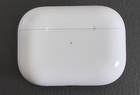
Apple AirPods Pro 2nd Gen A2700 MagSafe Charging Case Lightning (Case Only)
£34.00
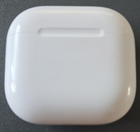
View detailsGenuine Apple AirPods 3rd Gen Lightning Charging Case A2897 Case Only is a live listing in our Mobile Phones & Communication catalogue, currently priced at £28.16. Checkout is completed securely on eBay.

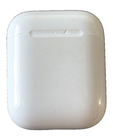
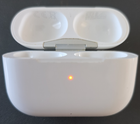
Genuine Apple AirPods charging case only.
Model A2897, for Apple AirPods (3rd generation).
This version uses a Lightning charging connection.
Case only – no AirPods/earbuds, charging cable, box or other accessories are included.
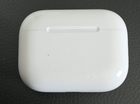
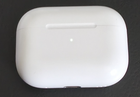
Used condition with visible cosmetic wear from previous use, including scratches, scuffs and marks. Please check all photographs carefully for the exact condition.
The case is marked with Apple model information and is intended for use with compatible 3rd generation AirPods.
Model: A2897
Please make sure A2897 is the correct case model for your AirPods before purchasing.
Photos form part of the description and show the actual item supplied.
IMPORTANT – REPLACEMENT CHARGING CASE SETUP & COMPATIBILITY
Model: A2897 – Apple Lightning Charging Case for AirPods 3rd Generation.
COMPATIBILITY: The A2897 charging case is designed for Apple AirPods 3rd Generation.
Compatible AirPods 3rd Generation earbud models are:
- A2565
- A2564
NOT COMPATIBLE with AirPods 1st Generation, AirPods 2nd Generation, AirPods 4, AirPods Pro or other AirPods models.
Please check the model numbers printed on both of your existing AirPods before purchasing.
The A2897 is a Lightning Charging Case. It has a Lightning charging port on the bottom and the status light is located on the front of the case.
When fitting your existing AirPods into a replacement charging case, the AirPods and replacement case may need to be synchronised before they will pair correctly. A flashing amber/orange status light during initial setup does not necessarily indicate that the replacement case is faulty.
PLEASE FOLLOW THIS SETUP PROCEDURE:
1. Place both compatible AirPods 3rd Generation earbuds (A2565/A2564) into the replacement A2897 charging case.
2. Connect the charging case to a power source using a Lightning cable.
3. Close the lid and leave the case connected to power for 20 minutes.
4. Open the lid.
5. If the status light is flashing white, continue to step 7.
6. If the status light is not flashing white, keep the lid open and press and hold the setup button on the back of the charging case for approximately 15 seconds, until the status light flashes amber and then white.
7. With the status light flashing white, close the lid.
8. On your iPhone or iPad, go to Settings > Bluetooth. If your AirPods are already listed, tap the information button next to them, select Forget This Device, and confirm.
9. Open the charging case with both AirPods inside and go to the Home Screen of your iPhone or iPad.
10. When the AirPods setup animation appears, select Connect, then Done.
IMPORTANT
Please complete the above replacement-case setup procedure before concluding that the charging case is faulty.
If you experience a problem after completing the procedure, please contact us and provide the model numbers printed on both of your AirPods so that compatibility can be checked.
REF00560