About this item
Apple AirPods Pro 3 A3063 Right Earbud Genuine Replacement
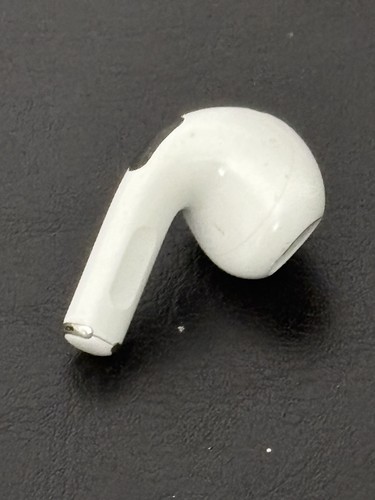
Genuine Apple AirPods Pro 3 right-hand replacement earbud, model A3063.
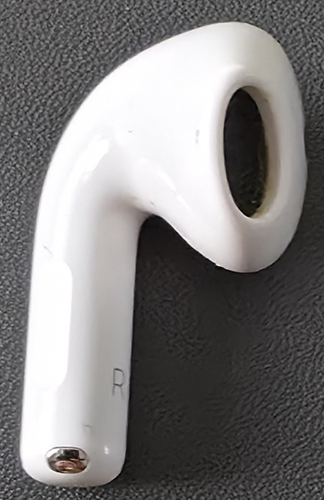
RIGHT SIDE ONLY – the stem is marked “R”.
Ideal as a replacement for a lost or damaged right AirPod from a compatible AirPods Pro 3 set.
Brand: Apple
Model: A3063
Product: AirPods Pro 3
Generation: 3rd Generation
Year Introduced: 2025
Side: Right / R
Colour: White
Quantity: 1 Earbud
CONDITION
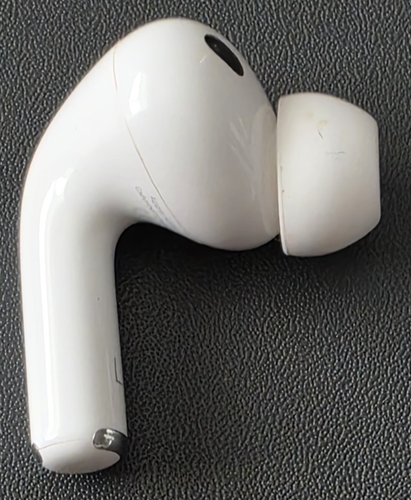
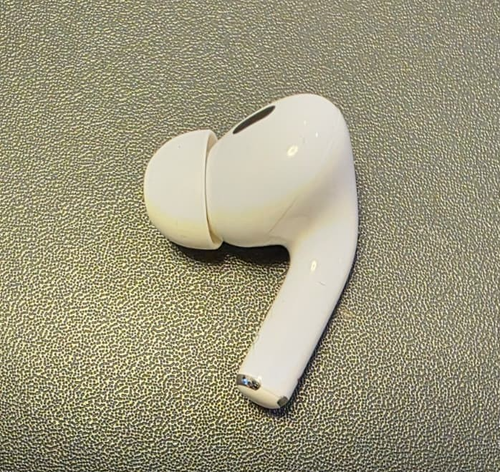
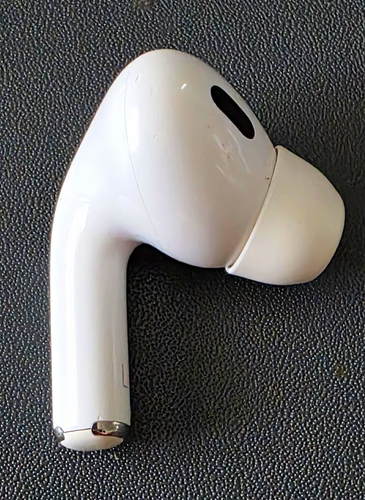
Pre-owned condition with visible signs of previous use.
There are cosmetic marks, scratches and general wear visible to the white body, silicone ear tip and lower stem/contact area.
Please inspect all photographs carefully for the exact cosmetic condition, as they form part of the description.
Silicone ear tip is fitted as shown.
This listing is for the single RIGHT A3063 earbud shown in the photographs only.
No left earbud, charging case, charging cable, retail box or other accessories are included.
COMPATIBILITY
This is the RIGHT AirPods Pro 3 earbud, model A3063.
Correct matching components:
• Right AirPod: A3063 – THIS ITEM
• Matching Left AirPod: A3064
• Compatible Charging Case: A3122 MagSafe Charging Case (USB-C)
Apple identifies AirPods Pro 3 as the generation introduced in 2025.
IMPORTANT: AirPods from different generations are not interchangeable simply because they look similar. Please check the model number of your existing left AirPod and charging case before purchasing.
This A3063 replacement is intended for an AirPods Pro 3 set using the matching A3064 left earbud and A3122 charging case.
HOW TO SET UP YOUR REPLACEMENT AIRPOD
The following procedure is based on Apple's official replacement setup instructions for AirPods Pro 3:
1. Put both AirPods – your existing left AirPod and this replacement right AirPod – into the compatible charging case.
2. Connect the charging case to a power source, close the lid and wait 20 minutes.
3. Open the lid and check the status light.
4. If the status light is flashing white, continue with the setup.
5. If the status light is not flashing white, with the lid open, double-tap the front of the charging case while the status light is on.
6. Double-tap the front again when the status light is flashing white.
7. Double-tap the front a third time when the status light begins flashing faster.
8. When the status light flashes amber and then white, continue with the setup.
9. With the status light flashing white, close the charging case lid.
10. On your iPhone or iPad, go to Settings > Bluetooth.
11. If your AirPods already appear in the Bluetooth list, tap the More Info button next to them, select Forget This Device and confirm.
12. Open the charging case lid and go to the Home Screen on your iPhone or iPad.
13. When the AirPods setup animation appears, tap Connect and then Done.
Your replacement AirPod should then be ready for use.